
Cloud Server Firewall Settings
Cloud server security settings
If the current deployment is hosted on a public cloud, you need to open the required ports in the firewall.
a. Add the following ports to the access rules.
If the IP address of the service user is fixed, you can restrict the allowed source IP addresses in the public cloud firewall.
TCP   Port: 8899          Source: All IPV4(0.0.0.0/0)     Description: easycallcenter365 gui / admin portal
TCP   Port: 1081          Source: All IPV4(0.0.0.0/0)     Description: easycallcenter365 call control panel
UDP   Port: 21002/31002   Source: All IPV4(0.0.0.0/0)     Description: easycallcenter365 rtp audio port
UDP   Port: 5080          Source: All IPV4(0.0.0.0/0)     Description: easycallcenter365 inbound port
UDP   Port: 5060          Source: All IPV4(0.0.0.0/0)     Description: easycallcenter365 for extension Registration
b. Configure the correct SIP listening IP address.
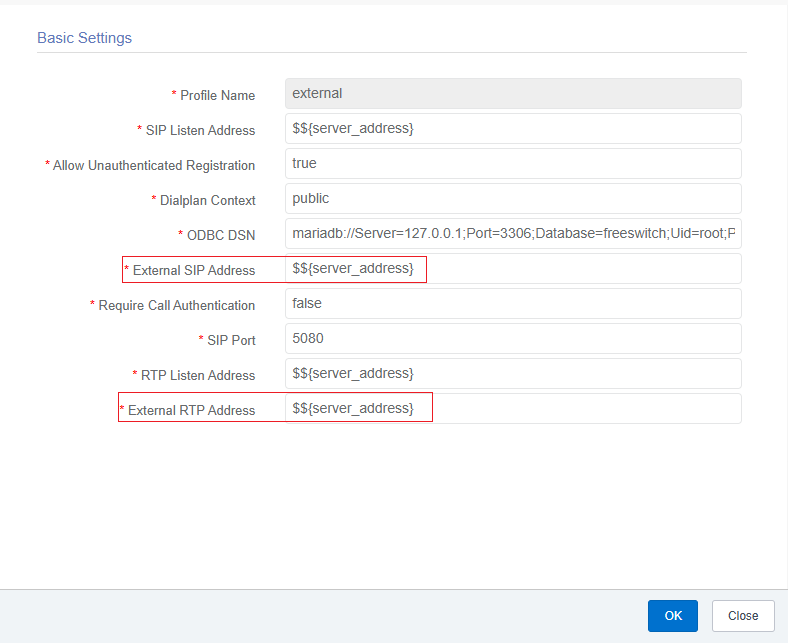
Go to Basic Configuration -> SoftSwitch -> SIP Profile in the admin portal.
Modify internal: change both External SIP Address and External RTP Address to the public IP address of your cloud server.
Modify external: change both External SIP Address and External RTP Address to the public IP address of your cloud server.
Debian 12 System Firewall Configuration
This setting applies to scenarios where the service user's source IP address is not fixed.
In this case, the built-in firewalld firewall in Debian 12 is used to dynamically manage firewall rules.
a. Install firewalld
sudo apt-get -y install firewalldb. Configure it in the admin portal
Go to Basic Configuration -> Parameter and search for Parameter Code: firewalld-enabled. Set it to true.
EasyCallCenter365 will automatically take over the management of the system’s firewalld firewall.
Based on the information obtained at runtime, it will automatically manage the IP whitelist.
Note: If you need to add additional firewall rules at this point, add them in the admin portal under Basic Configuration -> Firewall.
Warning: Do not use the system command firewall-cmd to maintain firewall rules at this point, because the configuration will be overwritten by EasyCallCenter365.
No comments to display
No comments to display